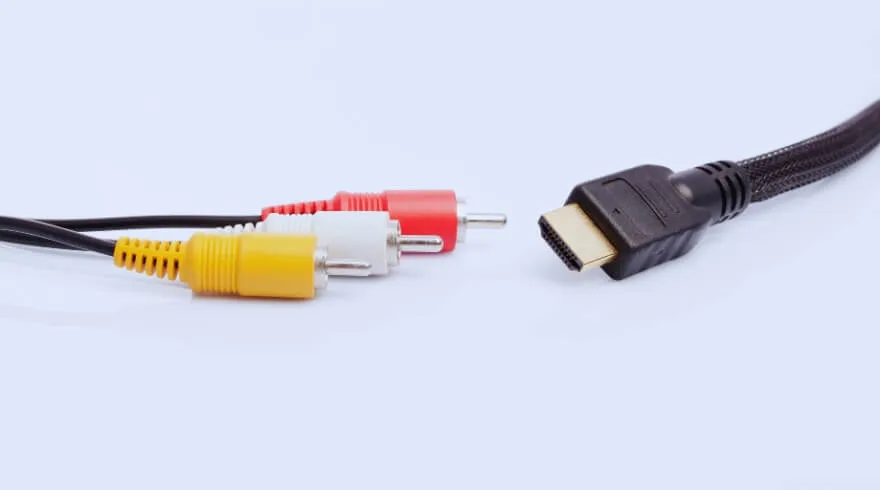
What You Need Before Connecting?
Before starting the connection process between your home theatre system and your T.V, you should prepare all required components as your first step. The complete set of required equipment will enable us to establish the system without facing any difficulties during the installation.
Here are the essential items you’ll need:
- • Home theater system
- • TV (Smart/LED)
- • HDMI / Optical / AUX cables
- • Remote control for settings
How to Connect a Home Theater to a TV Using HDMI ARC?
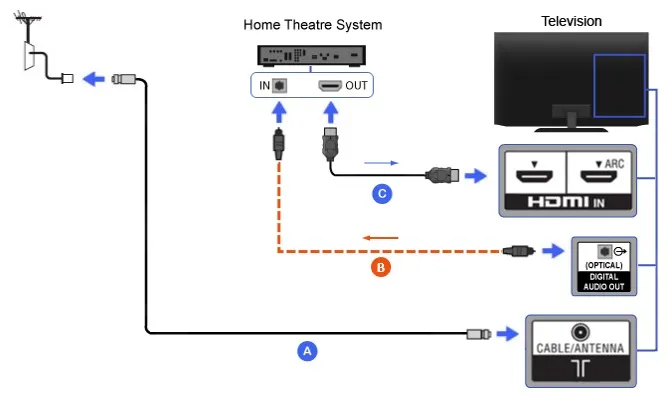
- • Connect the HDMI cable to the ARC port on both your TV and home theater system to establish the connection.
- • Turn on both the TV and the home theater system to begin the setup process.
- • Go to your TV settings and navigate to the sound or audio output section.
- • Select “Audio System” or “External Speakers” to route the sound through your home theater.
- • Play any video or audio content to check if the sound is coming through the home theater system correctly.
How to Connect a Home Theatre to a TV Using an Optical Cable?
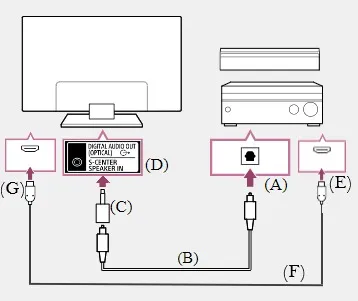
Works if your TV does not support HDMI ARC
Here’s how to connect your home theatre to your TV using an optical cable for clear digital audio output:
- • Connect the optical cable from the TV’s optical output port to the home theatre’s optical input port.
- • Turn on both the TV and the home theatre system.
- • Go to your TV settings and navigate to the sound or audio output section.
- • Select “Optical” or “Digital Audio Output” as the sound output option.
- • Play any content to check if the audio is coming through the home theatre system properly.
How to connect a home theatre to a TV using HDMI and optical cable together?
Here’s how to connect your home theatre to your TV using both HDMI and optical cables for better audio performance:
- 1. Connect the HDMI cable from your TV to the home theatre system for video transmission.
- 2. Connect the optical cable from the TV’s audio output to the home theatre’s optical input for sound.
- 3. Turn on both the TV and the home theatre system.
- 4. Go to the TV settings and navigate to the sound or audio output section.
- 5. Select optical or external audio system as the sound output option.
- 6. Play content to ensure audio is coming through the home theatre system correctly.
How to Connect a Home Theatre to a TV Using AUX or RCA Cable?
Suitable for older TVs without HDMI or optical ports
- • Connect the AUX or RCA cable from the TV’s audio output to the home theatre’s input ports.
- • Turn on both the TV and the home theatre system.
- • Go to your TV settings and navigate to the sound or audio output section.
- • Select “External Speakers” or “Audio System” as the output option.
- • Play content to ensure the audio is coming through the home theatre system properly.
Conclusion
Hope this guide helps you understand the different ways to connect your home theatre to your TV and choose the method that works best for your setup and device compatibility.
Enhancing your home entertainment experience starts with the right setup and the right equipment. If you’re planning to upgrade or create a premium audio experience, explore the latest home theatre systems from HomeConnect Cinemas and find the perfect solution tailored to your space and needs.
FAQ’s
1. Why is there no sound from my home theatre after connecting?
Check if the correct audio output (HDMI ARC, optical, or external speakers) is selected in your TV settings and ensure cables are properly connected.
2. Why is my TV not detecting the home theatre system?
Make sure the correct input source is selected on the home theatre and features like HDMI-CEC or ARC are enabled in settings.
3. How do I fix audio delay or sync issues?
Go to TV audio settings and adjust the audio delay or lip-sync option to match sound with video.
4. Can I control my home theatre with the TV remote?
Yes, if you are using HDMI ARC with HDMI-CEC enabled, you can control volume using your TV remote.
5. Which connection gives the best sound quality?
HDMI ARC or eARC provides the best audio quality, followed by optical cables, while AUX/RCA offers basic sound output.